

Early-stage startups and SaaS products live or die by first impressions. When a potential customer lands on your site or opens your app, they form a judgment within seconds. If the interface feels confusing, cluttered, or untrustworthy, they leave, and they rarely come back.
This guide breaks down what a UI UX designer actually does, how the disciplines work together, and how startup teams can build products that convert visitors into users.
Why Your Startup Needs a UI UX Designer
Unclear interfaces kill trust. When a founder pitches investors, the first thing most VCs do is visit the company’s website or try the product. If the experience feels amateur or confusing, credibility evaporates. According to Adobe’s 2024 research, 88% of users abandon sites after a poor experience. For early-stage startups competing for attention and funding, this isn’t just a design problem, it’s a business survival issue.
The same dynamic plays out with customers. A B2B SaaS product with a cluttered dashboard or a marketing site with unclear pricing sends a signal: these people don’t have their act together. Conversion rates drop, trial sign-ups stall, and growth flatlines.
Defining the UI UX Designer Role
A user experience designer is a key profession responsible for ensuring the visual and functional accuracy of user interfaces. A UI UX designer is a hybrid role responsible for the full digital experience. This includes:
- Structure (UX): How information is organized, how users flow through tasks, and how easy it is to accomplish goals
- Visual language (UI): The look and feel – typography, color, spacing, component styling, that shapes perception and guides interaction
- Interaction behavior: How elements respond to clicks, taps, hovers, and errors across web apps, mobile apps, and marketing sites
Interaction designers focus on guiding the behavior, flow, and functionality of the user interface, often working closely with visual and industrial designers to ensure a cohesive user experience.
UI/UX designers often collaborate with other roles such as business analysts to ensure the product meets both user and business needs.
UI vs UX in Plain Terms
User experience design focuses on the journey. The term ‘user experience’ was coined by Don Norman, a cognitive scientist and co-founder of the Nielsen Norman Group, whose work has greatly influenced modern design practices. UX designers conduct user research, map out flows, build information architecture, and ensure users can complete tasks without friction.
User interface design focuses on the surface. Understanding the end user’s needs and goals is central to both UI and UX design, guiding decisions that improve usability and satisfaction. UI designers create the visual elements users see and touch, buttons, inputs, cards, icons, layouts, and ensure they communicate clearly and consistently. The user interface is what makes a product feel polished, professional, and trustworthy.
How the Disciplines Overlap
In practice, especially at smaller agencies and startup teams, these two different roles often merge. At Webgamma, UI and UX work happens on the same project roadmap. The integration of UI and UX roles is essential for creating products that effectively meet user needs and facilitate communication among designers, developers, and stakeholders. The same designer might conduct usability testing in the morning and refine button states in the afternoon. This integration prevents the common disconnect where a product looks beautiful but fails to convert because the underlying flow was never validated.
Core Responsibilities of a UI UX Designer
The day-to-day work of a UI UX designer goes far beyond pushing pixels. Strong design skills, including both technical and soft skills, are essential for UI/UX designers to fulfill their wide-ranging responsibilities. Here’s what the role actually involves across UX and UI disciplines.
Core UX Responsibilities
- Stakeholder interviews: Meeting with founders, product managers, and customer-facing teams to understand business goals, user pain points, and constraints
- User research planning: Designing studies to gather insights – interviews, surveys, and task-based sessions with real users
- Building user flows: Mapping out how users move from entry point to completed goal (sign-up, purchase, feature adoption)
- Information architecture: Structuring content and navigation so users find what they need without guesswork
- Wireframing: Creating low-fidelity prototypes and layouts that establish content hierarchy and flow before visual design begins
- Usability testing: Running sessions with real users to identify friction points, confusion, and drop-off risks
Core UI Responsibilities
- Component libraries: Designing reusable elements – buttons, inputs, cards, modals – with consistent styling
- State design: Defining how components look in every state (default, hover, pressed, disabled, error, loading)
- Responsive layouts: Ensuring designs work across screen sizes, from mobile phones to wide desktop monitors
- Visual hierarchy: Using size, contrast, color, and spacing to guide attention and communicate importance. Effective visual representation is crucial for communicating data, brand identity, and user experience through UI design.
- Brand alignment: Translating brand guidelines (logo, palette, typography) into interface patterns that feel cohesive
Collaboration with Other Teams
UI UX designers don’t work in isolation. Key collaborations include:
- Developers: Handing off designs via Figma specs, defining design tokens (colors, spacing, type scales), and clarifying responsive design breakpoints for Webflow or WordPress builds
- Marketing teams: Designing landing pages, lead generation flows, product tour screens, and email templates that convert
- Product managers: Aligning on feature priorities, defining requirements, and balancing user needs with business goals
The Full Journey Responsibility
At Webgamma, our UI UX designers often own the complete experience, from the first impression on the homepage to the moment a user becomes an activated product customer. This includes the marketing site, the sign-up flow, in-app onboarding, and ongoing product interactions. The goal is coherence: every touchpoint should feel like it came from the same trustworthy source and facilitates user-centered experiences.
Key Skills Every UI UX Designer Needs in 2026
The skill set for UI UX designers has evolved significantly. Here are the key skills required to succeed in 2026, organized by discipline.
User Research Skills
Conducting user research, often referred to as UX research, is the foundation of good UX. UX research is a foundational step in understanding user needs and informing design decisions throughout the entire user experience design process. This includes:
- Running interviews (typically 5-8 to uncover 80% of major pain points, per Nielsen’s “discount usability” research)
- Designing surveys to gather quantitative feedback at scale
- Planning and facilitating usability tests with real users
- Synthesizing findings into journey maps, personas, and opportunity areas that inform design decisions
UX Fundamentals
Strong knowledge of UX principles separates effective designers from decorators:
- Information architecture: Structuring content and navigation logically
- Interaction design: Defining how users interact with elements, including patterns for complex workflows
- Task flows: Mapping multi-step processes like checkout, onboarding, or feature adoption
- Error-state design: Handling what happens when things go wrong (validation errors, empty states, system failures)
UI Fundamentals
Visual design isn’t about making things pretty – it’s about clarity and communication:
- Typography systems: Selecting typefaces and establishing scales that work across headings, body text, and UI labels
- Color systems: Building palettes that support brand identity, accessibility, and functional needs (errors, success states, interactive elements)
- Grid usage: Applying consistent structure to layouts using column systems and spacing scales
- Component libraries: Creating design systems with reusable, scalable elements
Prototyping Skills
Different stages require different fidelity levels:
- Low-fidelity protorypes: Quick click-throughs for early validation and stakeholder alignment
- High fidelity prototypes: Polished, interactive prototypes that show real interactions, animations, and edge cases – critical for developer clarity and stakeholder buy-in
Tool Proficiency
UI UX designers need strong knowledge of basic design software:
- Figma – primary design tool for UI, components, prototypes
- FigJam / Miro – workshops, brainstorming, journey mapping
- Webflow – understanding implementation constraints for marketing sites
Soft Skills
Technical skills alone won’t make a designer effective:
- Communicating design decisions to non-design founders who need to understand the “why”
- Negotiating scope with product managers when timelines are tight
- Prioritizing features under startup constraints where everything feels urgent
- Collaborating closely with cross functional teams including developers, marketers, and executives
Salary Context
As a reference point, mid-level UI UX designer salaries in Canada ranged from $70,000 to $100,000 CAD in 2025, with significant variation based on location, company stage, and specialization. However, skills matter more than salary benchmarks when building a career – strong portfolios consistently outperform credentials.
UI vs UX: Clear Distinctions and How They Work Together
Many founders conflate UI and UX, which leads to a common mistake: investing heavily in visual design while neglecting usability. The result is a beautiful product that nobody can figure out how to use.
What UI Design Covers
UI design focuses on the tangible, visual layer:
- Layout and composition of screens
- Typography choices and text styling
- Color scheme and usage (backgrounds, text, interactive elements)
- Component styling (buttons, inputs, cards, navigation elements)
- Interaction feedback (hover states, focus states, error states, loading indicators)
- Animation and micro-interactions that guide attention
A UI decision might involve choosing the right button color and placement on a pricing page to maximize clicks.
What UX Design Covers
UX design focuses on the underlying structure and flow:
- User research and understanding of user behavior
- User flows and task completion paths
- Information architecture and content structure
- Wireframes and content hierarchy
- Usability and accessibility considerations
- Measuring task success and identifying friction
A UX decision might involve determining how many steps a user must complete to start a free trial – and whether those steps can be reduced without losing essential information.
Why You Need Both
A pricing page with beautiful UI but confusing UX (hidden comparison details, unclear tier differences, buried CTAs) will underperform. Conversely, a logically structured page with amateur visual design signals low credibility.
Successful digital products require both disciplines:
- UX ensures the flow makes sense: Users can accomplish their goals without confusion
- UI ensures the interface feels trustworthy: The visual perception aligns with a professional, credible brand
Webgamma’s Approach
At Webgamma, our design process starts from user experience – clarifying goals, mapping flows, and establishing information architecture – before moving into UI. This sequence matters especially for website redesigns and SaaS onboarding journeys where structure determines success.
The design process flows logically:
- Understand user needs and business goals
- Map the experience structure (flows, wireframes)
- Apply visual design and build the design system
- Validate with user testing before production
This prprevents the expensive mistake of redesigning screens because the underlying logic was flawed.
How to Become a UI UX Designer?
Whether you’re switching careers or upskilling within a product team, here’s a summarized and practical path to becoming a UI UX designer in 2026. Enrolling in a comprehensive design course focused on UI/UX can provide a structured, step-by-step curriculum with practical projects and certification to help you build essential design skills.
Step 1: Research the Field
Before investing months in learning, understand what the work actually involves:
- Read case studies from experienced designers (not just final shots, but the ux design process behind them)
- Explore product teardowns that analyze real apps and websites
- Review portfolios to see the range of work – some designers lean heavily UX, others UI, many are hybrid
This research helps you decide whether you lean more toward user research and flows (UX), visual design and systems (UI), or the full-stack approach.
Step 2: Learn Fundamentals
Build a foundation in both disciplines:
- Take targeted online programs focusing on web apps and marketing sites (avoid generic courses that only cover theory)
- Read foundational books – Don Norman’s “The Design of Everyday Things” for UX thinking, and current resources on interface patterns
- Practice with briefs that simulate real startup challenges: “Design an onboarding flow for a project management tool” rather than abstract exercises
Step 3: Master Tools
A 2-3 month Figma learning plan should cover:
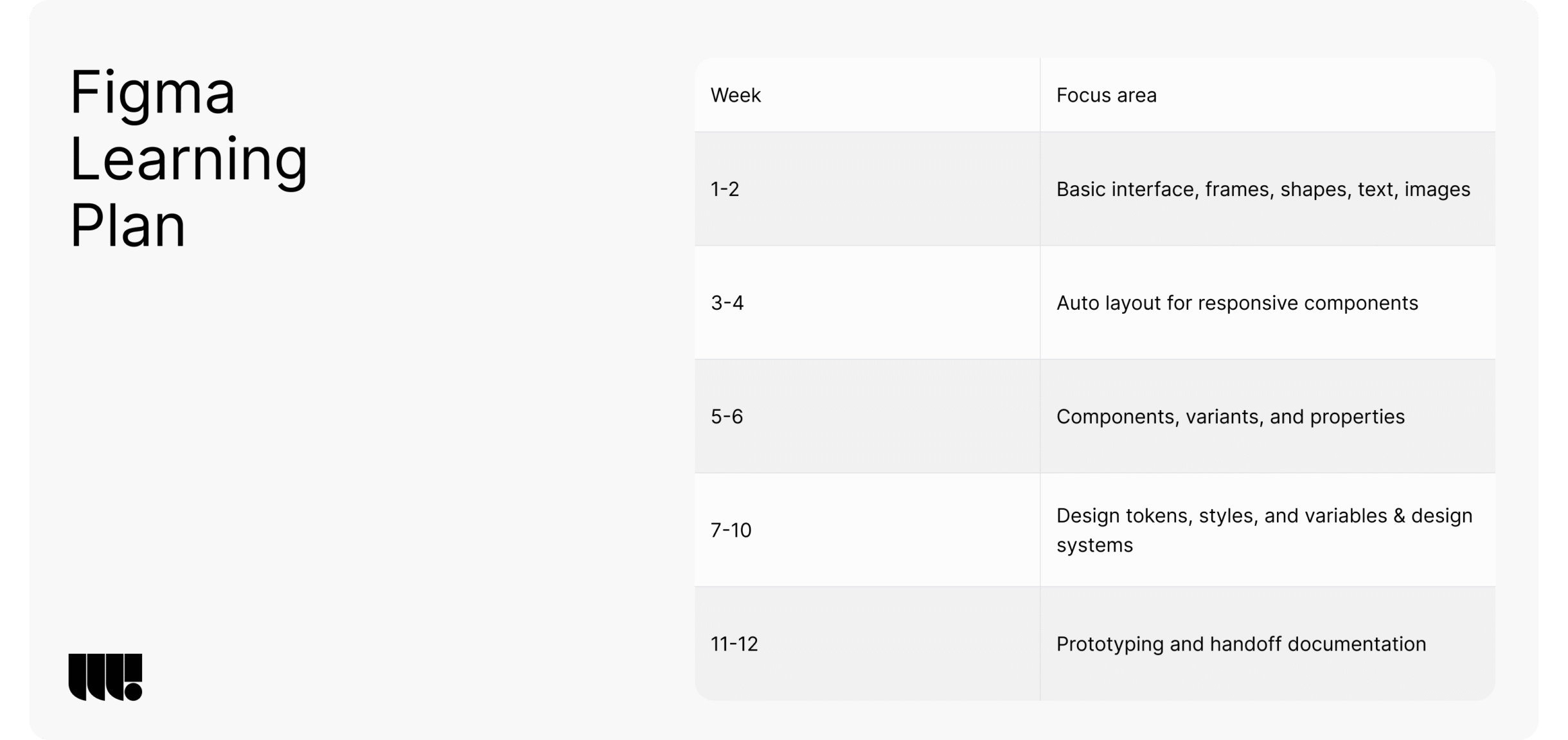
Focus on actually building components and systems, not just drawing screens.
Step 4: Build Practical Projects
Your portfolio needs 3-5 case studies that demonstrate real problem-solving:
- A SaaS dashboard redesign showing how you improved usability
- A mobile onboarding flow with clear rationale for each screen
- A marketing website for an early-stage startup addressing credibility and conversion
- An interaction design challenge (complex form, multi-step wizard, error handling)
Each project should show your process, not just final screens.
Step 5: Get Feedback
Design improves through critique:
- Join design communities (online and local)
- Attend meetups in cities like Montreal, Toronto, or Vancouver where tech scenes are active
- Ask senior designers for specific feedback on your case studies
- Iterate based on criticism – the ability to receive and apply feedback is itself a key skill
Step 6: Create a Portfolio
Each case study should include:
- Problem statement: What was broken or missing?
- Constraints: Timeline, budget, technical limitations
- Process: Research, wireframes, prototypes, iterations
- Design solutions: Final UI with rationale for design choices
- Outcomes: Measurable results if available (improved conversion, task success rate, user feedback)
Avoid portfolio sites that show only pretty pictures without context.
Step 7: Apply Strategically
Target roles that match your experience level:
- Startups: High autonomy, multiple hats, direct impact on product
- Digital agencies: Variety of projects, fast learning cycles
- Product teams: Deeper ownership of a single product
Customize your portfolio for UI-heavy or UX-heavy roles based on the job description.
Webgamma occasionally collaborates with freelance UI UX designers on projects. If you have 2-3 solid case studies and want to work on startup projects, reach out.
UI UX Designer Career Paths in Startups, Agencies, and Product Teams
A career in UI UX design connects directly to business outcomes: user retention, growth metrics, and funding readiness. Here’s how different paths compare.
Agency Path
Working at a digital agency (like Webgamma) offers:
- Variety: Projects across industries – SaaS, Ecommerce, B2B services, marketplaces
- Fast learning: Compressed timelines mean rapid skill development
- Full-stack exposure: Working alongside branding, development, and strategy teams
- Client-facing skills: Learning to communicate design decisions to diverse stakeholders
The tradeoff: less depth on any single product, more context-switching.
In-House Product Path
Joining an established product team offers:
- Deep ownership: Years working on the same product, understanding every nuance
- Data access: Collaborating with data teams to measure impact precisely
- Specialization: Opportunity to go deep on specific areas (onboarding, monetization, accessibility)
- Career ladders: Clearer progression paths at larger companies
The tradeoff: less variety, potentially slower skill broadening.
Startup Path
Early-stage startup roles involve:
- Multiple hats: Handling research, UX, UI, and sometimes basic product strategy
- Ambiguity tolerance: Working without established processes or clear briefs
- Direct impact: Your design choices directly affect activation rates and MRR
- Speed: Shipping quickly and iterating based on user feedback
The tradeoff: less mentorship, more pressure, potential for burnout.
Specialization Options
As careers progress, designers often specialize:
- UX Researcher: Focus entirely on conducting user research and synthesizing findings
- Interaction Designer: Deep expertise in complex interaction patterns and animations
- Product Designer: Hybrid role owning end-to-end feature design within a product
- Design Systems Specialist: Building and maintaining scalable component libraries
- Conversion-Focused Web Designer: Optimizing marketing sites and landing pages for leads and sales
Webgamma’s Team Structure
Webgamma operates remotely across Canada, with a core UI UX design team based in Montreal that collaborates with founders and marketing leaders nationwide. This distributed model enables access to top talent regardless of client location.
Long-Term Trajectory
Career progression typically moves through:
- Junior/Mid Designer → Senior Designer
- Senior Designer → Design Lead
- Design Lead → Head of Design / VP Design
- Alternative: Founding a design agency or product company
The path you choose depends on whether you prefer depth (product) or breadth (agency/consulting).
How a UI UX Designer Collaborates with Branding, Development Teams
UI UX design doesn’t exist in isolation. The best results come from integrated collaboration across disciplines.
Collaboration with Branding Teams
Branding establishes the foundation: logo, color palette, typography, tone of voice. The UI UX designer’s job is to translate this into:
- Scalable UI systems: Brand colors become button colors, background fills, and accent elements
- Typography patterns: Brand typefaces become heading scales, body text styles, and UI labels
- Consistent experience: The app, marketing website, and onboarding emails all feel like they come from the same company
Collaboration with Developers
Effective designer-developer collaboration requires:
- Design tokens: Centralized definitions of colors, spacing, and typography that developers reference
- Responsive rules: Clear specifications for how layouts adapt across breakpoints
- Interaction specs: Documentation of hover states, transitions, loading behaviors, and error handling
- Platform understanding: Awareness of WordPress or Webflow constraints so designs are implementable
The goal is zero ambiguity during development. Every design decision should be documented in a way that developers can execute without guessing.
Collaboration with Growth and Marketing Teams
Growth-focused design involves:
- High-conversion landing pages: Designing for specific actions (sign-up, demo request, download)
- A/B test support: Creating variations of key screens for experimentation
- Form optimization: Reducing friction in lead capture and checkout flows
- Pricing page clarity: Ensuring target audience understands value and can choose the right tier
Graphic designers and UI UX designers often work together on marketing assets, with UI UX designers focusing on interactive web page experiences.
A Real-World Example
A SaaS startup re-platforming from a dated WordPress site to a custom Webflow build engaged Webgamma for the transition. The project involved:
- Brand refresh with updated visual identity
- UX architecture clarifying messaging hierarchy and user flows
- UI system with components built for Webflow’s capabilities
- Development in Webflow with responsive design across devices, including page transitions
- Post-launch iteration based on analytics and user testing
The result: a 47% increase in demo requests within 60 days of launch, driven by clearer positioning and simplified sign-up flow.
If your team needs a UI UX partner that can handle branding, design systems, and development, get in touch with our Montreal-based branding experts.
Common UI UX Mistakes That Kill Conversion (and How Designers Fix Them)
Certain design mistakes directly impact revenue. Here’s what to avoid – and how experienced UX designers and UI designers fix these problems.
UX-Specific Mistakes
- Designing without user research: Assumptions replace insights, leading to products that solve imaginary problems
- Skipping usability testing: Launching without validation means shipping friction that could have been prevented
- Relying solely on stakeholder opinions: Internal perspectives don’t represent actual user behavior
- Ignoring empty states and error states: Users encounter confusing dead-ends when things go wrong
UI-Specific Mistakes
- Low contrast text: Fails WCAG accessibility guidelines and frustrates users with visual impairments
- Confusing color usage: Using the same color for decorative and interactive elements creates ambiguity
- Inconsistent component styles: Buttons that look different on every page signal lack of polish
- Visual overload: Too many design elements competing for attention causes cognitive fatigue
Simple Fixes That Work
- Simplify navigation labels: Replace jargon with plain language users actually search for
- Add onboarding tooltips: Guide new users through complex features without overwhelming them upfront
- Standardize button styles: Create a clear hierarchy (primary, secondary, tertiary) and apply consistently
- Clarify form validation: Tell users exactly what’s wrong and how to fix it
Webgamma includes structured UX reviews and usability checks as part of website redesigns and product UI updates. This prevents shipping mistakes that erode trust and kill conversions.
How Webgamma Approaches UI UX Design for High-Trust Websites and SaaS Products
Transparency in process builds confidence. Here’s the step-by-step approach Webgamma uses to create credible, high-performing digital products.
Step 1: Discovery and Clarity
Before any design work begins:
- Positioning workshops: Clarify what makes the product different and who it serves
- Audience definition: Identify primary users, their goals, and their current frustrations
- Success metrics: Define what winning looks like (demo requests, free trial sign-ups, booked calls)
- Constraint mapping: Understand timeline, budget, and technology requirements
This phase ensures everyone aligns on what “done” means before work starts.
Step 2: UX Architecture
Structure before surface:
- Information architecture: Organize content and navigation logically
- User journey mapping: Document how users move from awareness to activation
- Core flow design: Map critical paths – pricing, signup, onboarding, feature adoption
- Wireframes: Create low-fidelity layouts establishing content hierarchy and interaction patterns
This phase catches structural problems before they become expensive to fix.
Step 3: UI and Design Systems
Visual design with purpose:
- Brand integration: Translate visual identity into UI patterns
- Component library: Build flexible, scalable elements in Figma (buttons, forms, cards, navigation)
- Screen design: Create high fidelity designs for all key pages and states
- Responsive specifications: Define how layouts adapt across devices
The final product is a complete design system ready for Webflow or WordPress development.
Step 4: Build and Validate
Execution with precision:
- Developer collaboration: Hand off designs with clear specs and design tokens
- Pixel-accurate builds: Ensure implementation matches design intent
- Usability testing: Run sessions with real users before and after launch
- Performance checks: Validate Core Web Vitals and accessibility compliance
This phase ensures the final product matches the vision.
Step 5: Iterate and Optimize
Design doesn’t end at launch:
- Behavior analysis: Review analytics to identify drop-off points and opportunities
- User feedback integration: Incorporate qualitative feedback from support tickets and user interviews
- Continuous refinement: Improve copy, interaction patterns, and critical funnels based on data
This integrated approach helps early-stage teams ship faster, maintain design consistency throughout the product lifecycle, and build investor-ready credibility.
Next Steps: Choosing the Right UI UX Designer or Agency
If you’re evaluating designers or agencies for your startup’s digital product, here are the decision criteria that matter. Certifications from industry leaders such as General Assembly and Adobe can also enhance a UI/UX designer’s credentials, providing additional assurance of their professional development.
Assess Portfolio Fit
Look for projects similar to your context:
- B2B SaaS products if you’re building B2B SaaS
- Complex dashboards if you have workflow-heavy features
- Marketing sites if you need lead generation optimization
- Early-stage startup work if you’re pre-Series A
Visually impressive work matters less than relevant problem-solving experience.
Ask About Process
Dig into how they work:
- How do they handle user research and validate design decisions?
- How do they align with stakeholders before major design work?
- What does handoff to development look like?
- Do they support post-launch iteration?
A clear process signals reliability. Vague answers signal risk.
Check for Strategic Thinking
The best designers connect UI UX decisions to business outcomes:
- Do they ask about conversion metrics, not just aesthetic preferences?
- Can they articulate why a design choice supports activation or retention?
- Do they consider the entire journey, or just individual screens?
If conversations stay purely visual, you may be working with graphic designers rather than product-minded UI UX designers.
Evaluate Collaboration Model
Consider how the engagement will work:
- Will you work with senior designers or be handed off to juniors?
- How do they collaborate closely with your existing team (product managers, developers, marketers)?
- What’s the communication cadence and tooling?
Webgamma’s Differentiation
Webgamma combines brand, UX, and web development into one system. Instead of juggling multiple vendors with inconsistent deliverables, teams work with a single partner accountable for the complete experience – from positioning through design through build.
This integrated model:
- Reduces coordination overhead
- Maintains design consistency from brand to product
- Ships faster with fewer handoff gaps
- Creates credible, user friendly experiences that support growth
Take the Next Step
If your current website or SaaS product struggles with:
- Users who can’t figure out what you do or how to get started
- Low conversion rates despite decent traffic
- Investor feedback about product credibility
- Inconsistent design across marketing site and product
…it’s time to address your UI UX foundations.
Get in touch to discuss your project, or take the assessment to identify where your current UI UX is blocking trust and conversions.